Part 1 of 2. Part 2: From Self-Hosted HLS to Bunny Stream — What Changes and What Breaks.
A TVOD (transactional video-on-demand) platform — the kind where users buy tickets to watch movies instead of paying a monthly subscription. Think Apple TV rentals, not Netflix. The backend was coming along: NestJS monolith, PostgreSQL, JWT auth, movie catalog, ticket purchases, all test-driven. But the most important question was still open: can the thing actually stream video?
Design docs are comfortable. They describe CMAF packaging, multi-DRM with Widevine and FairPlay, CloudFront signed cookies, adaptive bitrate ladders. Everything sounds great on paper. But paper doesn’t buffer.
So a few days went into building a proof of concept. A real one — movie catalog, authentication, click play, video streams. Deployed on a server that costs nothing. It took longer than expected, about three days of building, debugging, and questioning various life choices. Here’s everything that went wrong, and the few things that went right.
The headline: three days, $0 hosting, six bugs that each cost hours. Shaka Player + HLS + Caddy + NestJS on an Oracle Always Free ARM server, fronted by a Cloudflare Tunnel.
Table of contents
Open Table of contents
Why a POC Before DRM
Multi-DRM (Widevine, FairPlay, PlayReady) is complex. Providers like PallyCon charge per license. AWS MediaConvert bills per minute of encoding. CloudFront bills per GB of egress. Before committing to any of that, the thing to prove was whether the architecture works: reverse proxy routing, player integration, session lifecycle, the deployment pipeline.
Plain HLS without encryption validates all of this. DRM is a layer on top — a configuration change, not an architectural one.
The Architecture That Matters
Most streaming tutorials show how to use HLS.js or Video.js with a hardcoded manifest URL. That’s not how production works. Production streaming has a same-origin architecture:
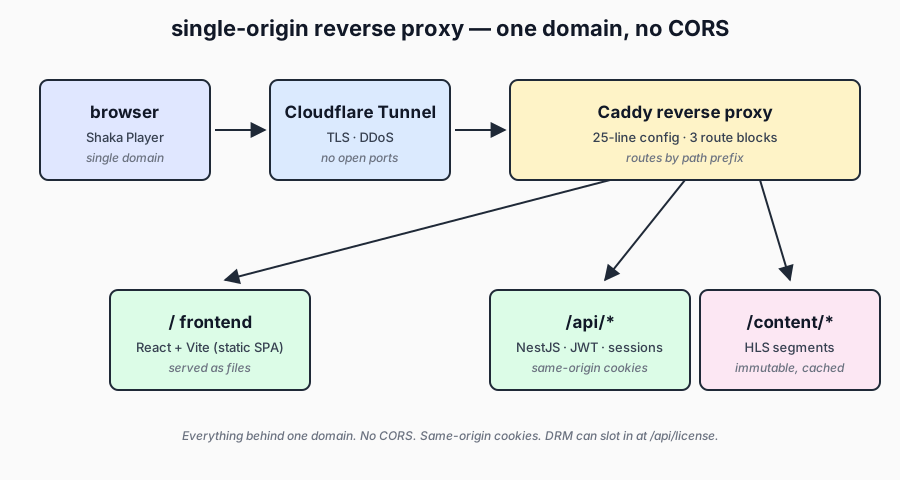
Browser → single domain → Reverse Proxy
                            ├── /           → Frontend (SPA)
                            ├── /api/*      → Backend (REST API)
                            └── /content/*  → Media files (HLS segments)
Everything behind one domain. No CORS. Same-origin cookies work without SameSite=None. CloudFront signed cookies (when added later) scope naturally to the domain. No preflight OPTIONS requests eating into the latency budget.
Caddy worked well as the reverse proxy here. The entire config is 25 lines.
The Stack
- Backend: NestJS 11, TypeORM, PostgreSQL 16 — same patterns as the main codebase so features can migrate without a rewrite
- Frontend: React 19, Vite — two pages total (movie list + player)
- Player: Shaka Player (Google, Apache 2.0) — handles HLS natively, supports DRM when needed later
- Proxy: Caddy 2 — reverse proxy + static file server
- Media: ffmpeg encoding Big Buck Bunny to HLS (Blender open movies are great test content)
- Infra: Oracle ARM Always Free (4 OCPU, 24GB RAM), Cloudflare Tunnel, Docker Compose
Total hosting cost: zero. The Oracle Always Free tier is genuinely free — not a trial, not a credit burn. Combined with Cloudflare Tunnel, that’s HTTPS, DDoS protection, and a custom domain without exposing a single port.
The Stream Lifecycle
Before the player touches a manifest URL, the backend manages a session:
- User clicks Play
- Frontend calls
POST /api/stream/initiatewith the movie ID - Backend validates auth, looks up the movie asset, creates a
stream_sessionsrow, returns the manifest URL - Frontend initializes Shaka Player with the manifest
- Every 30 seconds, a heartbeat call updates watch position
- On close/navigate away, a stop call marks the session ended
This gives an audit trail: who watched what, when, for how long, and where they left off (for resume). In production, step 3 would also validate the user’s ticket, check the rental window, enforce concurrent stream limits, and generate a signed cookie. The POC skips all of that, but the skeleton is identical.
Six Walls, Six Fixes
1. TypeScript Path Aliases Die at Runtime
The NestJS code uses @/* path aliases (import { ResponseFactory } from '@/utils/response.factory.js'). TypeScript compiles them happily. The output dist/ directory still contains the @/ references. Node.js has no idea what @/ means.
First attempt was tsconfig-paths/register as a runtime flag. It needs tsconfig.json in the Docker image with baseUrl pointing to the right place. Worked locally, broke in Docker. The issue: baseUrl: "./" resolves differently depending on the working directory.
What worked: tsc-alias — a post-build step that rewrites path aliases to relative imports in the compiled JavaScript. One line: "build": "nest build && tsc-alias". The output is self-contained, no runtime path resolution needed.
2. Your UUID Isn’t a UUID
PostgreSQL validates UUID format strictly. The test seed data had u1000000-0000-4000-a000-000000000001. Looks UUID-ish, right? No. UUIDs are hexadecimal — characters 0-9 and a-f only. The u is invalid.
The error message (invalid input syntax for type uuid) doesn’t say which character is wrong. Took an embarrassingly long stare before spotting the u prefix.
Fix: Changed the prefix from u1 to c1. A two-character fix that cost twenty minutes.
3. Docker Volumes and Symlinks Don’t Mix
One test video was encoded, and three other movie IDs were symlinked to the same HLS output. On the host: perfect. Inside the Docker container: all symlinks resolve to nothing.
Docker bind mounts don’t follow absolute symlinks because the target path (/home/ubuntu/infra/apps/...) doesn’t exist inside the container. Relative symlinks didn’t help either — Caddy’s file server doesn’t follow those.
What worked: cp -r. Just copy the files. It’s a POC, the test content is 60MB. Sometimes the unglamorous solution is the right one.
4. The 404 That Lasted Forever
This one hurt. The Caddy config had Cache-Control: max-age=31536000, immutable on all files under /content/* — because HLS segments are immutable once encoded. Sounds reasonable.
The problem: the proxy was deployed before the media files existed. The browser requested the manifest, got a 404, and cached that 404 with immutable. Chrome interpreted this as “this resource will never change, don’t even ask the server again.” Hard refresh didn’t help. Force reload didn’t help. The only fix was clearing the entire browser cache.
The real fix: Split cache policies by file type.
@segments path_regexp \.ts$
header @segments Cache-Control "max-age=31536000, immutable"

@manifests path_regexp \.m3u8$
header @manifests Cache-Control "no-cache"
Segments are genuinely immutable — cache them forever. Manifests can change (different bitrates, updated content) — never cache them. A timestamp query parameter on manifest URLs in the player adds extra insurance.
Lesson: Never apply immutable caching to resources that might not exist yet. And never apply it to resources that serve as pointers to other resources (which is what manifests are).
5. The Fetch Wrapper That Ate Its Own Headers
The API client had this pattern:
const res = await fetch(path, {
  headers: { 'Content-Type': 'application/json', ...options.headers },
  ...options,
});
Spot the bug? The ...options spread includes options.headers, which replaces the merged headers object. When calling an authenticated endpoint, the Authorization header survived but Content-Type: application/json got dropped. The server couldn’t parse the request body. The movie ID came through as undefined. The validation returned “movieId must be a UUID.”
A lot of time went into debugging the wrong thing — checking movie IDs, database queries, entity mappings — before realizing the request body was just empty.
Fix: Destructure headers before spreading:
const { headers: optHeaders, ...rest } = options;
const res = await fetch(path, {
  ...rest,
  headers: { 'Content-Type': 'application/json', ...optHeaders },
});
6. Shaka Player vs. React Lifecycle
The initial player component was a tangle of useEffect hooks and useCallback with stale closures. The flow was: fetch movie, check auth, if logged in call startPlayback(). But startPlayback was a useCallback that captured token at creation time. After login, the state updated, the component re-rendered, but the callback still held the old null token.
Worse: the <video> element was conditionally rendered. When the auth state changed, the effect tried to initialize Shaka Player on a ref that pointed to nothing — the video element hadn’t mounted yet.
What worked: Stop fighting React’s lifecycle and model the player as an explicit state machine:
- Loading — fetching movie data (no video element)
- Login — showing auth form (no video element)
- Ready — showing movie details + Play button (no video element)
- Playing —
<video>element mounted, Shaka initializes via a dedicateduseEffect
Each state renders a completely different component tree. The video element only exists in the DOM when the player is actually playing. Shaka Player initialization runs in a useEffect that depends on the playing state. No stale closures, no refs to unmounted elements.
Infrastructure Isolation
The POC runs on the same VPS that hosts monitoring (Uptime Kuma), analytics (Umami), and log viewer (Dozzle). But it needed full isolation — its own database, no access to other services’ credentials.
Docker Compose networks make this clean. The POC has its own network (poc-internal) with its own PostgreSQL container. The proxy container joins both poc-internal (to reach the backend) and the shared web network (so Cloudflare Tunnel’s cloudflared container can route traffic to it).
The backend can talk to poc-postgres but cannot discover or connect to the shared postgres on the infrastructure network. Different network, different credentials, clean boundary.
What the POC Proved
After three days of building, deploying, breaking, and fixing, the POC confirmed the things that mattered:
Same-origin reverse proxy works for streaming. The Caddy config is trivial. Frontend, API, and media all live behind one domain. When CloudFront signed cookies come in later, they’ll scope to this domain automatically.
Shaka Player just works. Point it at an HLS manifest, call player.load(), video plays with adaptive bitrate. Adding DRM is a configuration change — pass a license server URL and a token. The player integration doesn’t change.
Stream sessions give a foundation. The stream_sessions table tracks every playback: who, what, when, how long, last position. This enables resume playback, concurrent stream limits, analytics, and forensic watermarking — all without changing the session model.
The deployment pipeline is repeatable. Docker Compose on an ARM VPS with Cloudflare Tunnel. Build, push, pull, docker compose up. The whole thing runs on 24GB of free ARM compute.
What’s Next
The POC streams unencrypted HLS. Production needs:
- DRM — PallyCon for multi-DRM (Widevine L1 on Android, FairPlay on Apple, PlayReady on Edge). This is a configuration layer on top of the existing player and manifest setup.
- Encoding pipeline — AWS MediaConvert with SPEKE v2 for DRM key exchange. Content encrypted once, served via both HLS and DASH manifests (CMAF).
- CDN — CloudFront with signed cookies scoped to the rental window. The reverse proxy architecture makes this a routing change, not an application change.
- Payments — Stripe integration with the existing ticket model. Purchase creates a ticket, playback validates the ticket.
Those are known problems with known solutions. The POC was about answering the question that didn’t have a known answer: does the architecture hold up when real bytes flow through it?
Turns out, it does. After enough debugging.
Continue to Part 2: From Self-Hosted HLS to Bunny Stream — What Changes and What Breaks.