Part 2 of 2. Part 1: Streaming Video on a $0 Server.
Part 1 proved that a TVOD streaming platform could run end-to-end on an Oracle Always Free ARM VPS. Shaka Player, HLS from Caddy, NestJS for auth and sessions, Cloudflare Tunnel for TLS. Zero dollars a month, and the architecture held.
What it did not prove was scale. One VPS in Hyderabad delivers ~200 ms first-byte latency to a viewer in New Jersey. There is no encoding pipeline — every rendition is a manual ffmpeg run. There is no DRM. Storage for 500 titles at five renditions each is ~2-3 TB, and the VPS has 200 GB.
This is the story of swapping the delivery layer for a managed CDN. The integration surfaced a specific Bunny Stream quirk around HLS token authentication that cost two days and is not well documented anywhere.
The headline: ~$0/mo → ~$400-700/mo at 5,000 MAU. Fifteen files changed. Zero changes to auth, sessions, or the frontend. One wall so stubborn that the POC initially shipped with CDN token auth disabled.
Table of contents
Open Table of contents
What self-hosted doesn’t solve
Four problems, in decreasing order of how hard they are to paper over:
- CDN egress. Cloudflare Tunnel is free, but it is proxying from a single machine in Hyderabad. For a global audience this is unacceptable latency. Real streaming needs edge PoPs worldwide.
- Encoding pipeline.
ffmpegis fine for a dozen test clips. For 500 titles at five renditions (H.264 plus HEVC), that’s a compute problem, not a script problem. - Storage. HLS segments across all renditions for a two-hour movie total ~4.5 GB (H.264 only), ~7 GB with HEVC. 500 titles is 2-3.5 TB. The VPS has 200 GB.
- DRM. Licensed content cannot ship as plain HLS. Content owners require Widevine plus FairPlay at minimum. Self-hosted HLS has zero DRM story.
Three options, one chosen
VdoCipher — killed by player lock-in
VdoCipher is the Indian option. Gurugram-based, battle-tested with Indian OTT, full multi-DRM including PlayReady. Looks perfect on the surface.
The dealbreaker: VdoCipher requires their proprietary player SDK. You cannot use Shaka Player. Their DRM license flow is tightly coupled to their custom Video.js-based player.
This is the kind of coupling I wanted to avoid. The player is the most visible and most customized part of my stack — ABR behavior, buffering strategy, error UX, DRM configuration. Encoding, CDN, and DRM keys are backend plumbing that can be swapped later. Switching to VdoCipher’s player means giving up control over all of that with no path back, so I moved on.
AWS pipeline — production target, overkill for Phase 1
Full control: MediaConvert for encoding, S3 for storage, CloudFront for egress, PallyCon for DRM. The reference architecture for any serious streaming product.
The problem is that it is 3-5× more expensive at every scale. One-time encoding for 500 titles runs ~$21,500 on MediaConvert versus ~$6,000 on Bunny. Monthly cost at 5,000 MAU lands around $2,100-2,770 versus $400-700 on Bunny. The gap widens at scale, not shrinks.
Bunny Stream — the winner
- Shaka Player compatible. Explicit documentation. Direct HLS manifest URLs work with any HLS-capable player.
- CDN pricing is 8-17× cheaper than CloudFront — $0.005-0.01/GB versus $0.085/GB.
- Enterprise DRM at $99/mo. Widevine plus FairPlay via MediaCage, launched in 2025.
- No PlayReady. Chromium-based Edge uses Widevine anyway, so the gap is Xbox, Roku, and legacy smart TVs. Acceptable for a mobile-first audience.
Cost at 5,000 MAU
| Provider | Monthly | One-time encoding |
|---|---|---|
| Bunny Stream | $400-700 | ~$6,000 |
| VdoCipher | $400-800 | $0 (included) |
| AWS pipeline | $2,100-2,770 | ~$21,500 |
The migration that looked easy
The code diff was small. The Caddy config went from four route blocks to three:
# Before (self-hosted)
:80 {
    handle /api/*    { reverse_proxy backend:3200 }
    handle /session  { reverse_proxy backend:3200 }
    handle /content/* { root * /srv/media; file_server }
    handle           { root * /srv/frontend; try_files {path} /index.html; file_server }
}

# After (Bunny Stream)
:80 {
    handle /api/*    { reverse_proxy backend:3200 }
    handle /session  { reverse_proxy backend:3200 }
    handle           { root * /srv/frontend; try_files {path} /index.html; file_server }
}
The /content/* route is gone. The player fetches HLS directly from Bunny CDN. The proxy container lost its media volume mount entirely. media/encode.sh and the media/output/ directory were deleted.
What came in was a single service — 85 lines — plus four env vars:
@Injectable()
export class BunnyService {
  private readonly apiKey: string;
  private readonly libraryId: string;
  private readonly cdnHostname: string;
  private readonly tokenAuthKey: string;

  constructor(config: ConfigService) {
    this.apiKey = config.getOrThrow('BUNNY_API_KEY');
    this.libraryId = config.getOrThrow('BUNNY_LIBRARY_ID');
    this.cdnHostname = config.getOrThrow('BUNNY_CDN_HOSTNAME');
    this.tokenAuthKey = config.getOrThrow('BUNNY_TOKEN_AUTH_KEY');
  }

  getSignedManifestUrl(videoId: string, expiresInSec = 3600): string {
    const expires = Math.floor(Date.now() / 1000) + expiresInSec;
    const token = createHash('sha256')
      .update(this.tokenAuthKey + videoId + expires)
      .digest('hex');
    return `https://${this.cdnHostname}/${videoId}/playlist.m3u8?token=${token}&expires=${expires}`;
  }

  async getVideo(videoId: string): Promise<BunnyVideoResponse> {
    const res = await fetch(
      `https://video.bunnycdn.com/library/${this.libraryId}/videos/${videoId}`,
      { headers: { AccessKey: this.apiKey } },
    );
    if (!res.ok) throw new Error(`Failed to fetch video: ${res.statusText}`);
    return res.json();
  }
}
The frontend change was one line:
// Before: local path constructed from asset data
await player.load('/content/' + asset.hlsPath + '/master.m3u8');

// After: signed Bunny CDN URL from the API response
await player.load(manifestUrlRef.current);
The manifestUrl comes from POST /api/stream/initiate, which calls BunnyService.getSignedManifestUrl() on the backend. The player does not know or care that the URL points to Bunny CDN. It is just an HLS manifest URL.
The movie_assets.cdn_url column — which stored a local path like /content/big-buck-bunny/ — now stores a Bunny video GUID (a1b2c3d4-e5f6-7890-abcd-ef1234567890). Same column, different content. Enough for a POC. A production schema would want a provider discriminator and a dedicated identifier column.
This part took a few hours. Then I started trying to secure the URLs.
The token auth wall
Bunny Stream advertises per-URL HMAC token authentication for CDN assets. The idea is straightforward: the backend signs a short-lived URL, the CDN validates the signature, unauthenticated requests get 403. Good defense-in-depth on top of backend JWT.
In practice, getting this working with Shaka Player took two days and ended with token auth disabled on the shipped POC.
Wall 1: the wrong key
Bunny’s dashboard shows two GUIDs for every Stream library: a library API key and a token auth key. They look identical. They are used for completely different things.
- Library API key — for REST API calls (upload, list, delete videos).
- Token auth key — for signing playback URLs.
I used the library API key for URL signing. Every request 403’d. The real token auth key sits under Stream → Library → Security → Token authentication key, a different GUID entirely. This is not in the same section as the API key.
Wall 2: “Block direct URL file access”
This setting was ON by default in the pull zone security settings. It blocks any request missing a Referer header. The backend generates signed URLs server-side — no browser context, no referer — so every request got 403 regardless of whether the token was correct.
This is not documented as a prerequisite for API-generated signed URLs. The fix is to turn it off under the pull zone security settings.
Wall 3: three signing formats, two work, one does not
Bunny’s docs show two different token systems without making the distinction sharp:
- Embed tokens (for their iframe player):
SHA256_HEX(key + videoId + expiry)in the URL query. - CDN pull-zone tokens (for direct HLS URLs):
Base64URL(SHA256_RAW(key + path + expiry))withtoken_pathfor directory scoping.
After fixing the key and the referer setting, I tested three approaches against the manifest URL:
| Format | Hash | Path | Encoding | Result |
|---|---|---|---|---|
| Full-path hex | SHA256 | /{videoId}/playlist.m3u8 | hex digest | 200 |
| Full-path Base64URL | SHA256 | /{videoId}/playlist.m3u8 | Base64URL | 200 |
| Directory-scoped | SHA256 | /{videoId}/ | Base64URL + token_path | 403 |
Formats 1 and 2 both worked for the manifest. Format 3 — the one that Bunny’s general CDN documentation recommends for HLS, because it should authorize any path under the video ID directory — consistently returned 403. Possibly a Stream pull-zone-specific limitation that diverges from the general Bunny CDN behavior.
Wall 4: the actual dealbreaker
All of the above was in service of signing the manifest. Shaka Player does not just fetch the manifest. HLS has sub-resources:
- Player requests
/{videoId}/playlist.m3u8— the master manifest. 200, because the token matches this exact path. - Master manifest references
360p/video.m3u8. Shaka constructs/{videoId}/360p/video.m3u8and fetches it. - Sub-manifest references
seg-1.ts,seg-2.ts. Shaka constructs/{videoId}/360p/seg-1.tsand fetches each one.
Shaka reuses the manifest’s token on every segment request. That token was signed for /{videoId}/playlist.m3u8, not for /{videoId}/360p/seg-1.ts. CDN token auth is per-path. Every segment request returns 403.
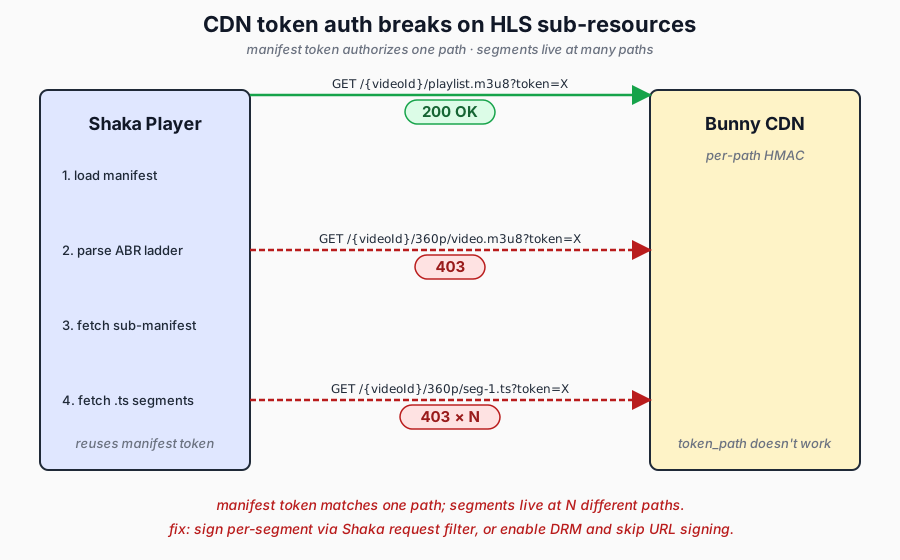
Directory-scoped tokens are the theoretical solution. They would authorize any path under /{videoId}/. But as the table above shows, token_path on Bunny Stream pull zones did not work — only the manifest URL ever returned 200 with that format.
The conclusion: CDN token auth on Bunny Stream was not designed for custom HLS players. The expected workflow is either their embed player (which auto-handles sub-resource signing internally) or DRM (which handles auth at the license-server level, not the URL level). Custom players with CDN token auth is an unsupported middle ground.
Three ways out
After exhausting the token auth path, there were three viable options:
Option A — disable CDN token auth. Rely on backend JWT to gate POST /api/stream/initiate. The manifest URL itself is not secret: the POC has no DRM content, so a leaked URL just plays a public test movie. Add referrer restrictions in the Bunny dashboard for basic protection against hotlinking. This is what the POC initially shipped.
Option B — per-segment signing via Shaka’s request filter. Shaka Player exposes NetworkingEngine.registerRequestFilter(), which lets you intercept every network request before it goes out, rewrite the URL, and add parameters. A fresh token can be computed per segment using the Web Crypto API. This works, and we ended up shipping it for the live deployment at globo-bunny.argha.dev. It adds a small per-segment latency for the HMAC calculation and a noticeable amount of player-layer complexity.
Option C — enable MediaCage DRM ($99/mo). Widevine and FairPlay handle authentication at the CDM and license-server level. The player requests a DRM license from Bunny’s license server, which validates the viewer. No URL signing needed, because the content is encrypted and useless without a valid license. This is the real answer for TVOD in production, and it validates the original design: Bunny Stream with DRM, not Bunny Stream with URL signing.
What stayed the same
The point of the whole exercise:
| Component | Details |
|---|---|
| Shaka Player config | Zero changes to initialization, error handling, or ABR config |
| JWT auth flow | AuthGuard, session endpoint, token storage — identical |
| Stream session lifecycle | POST /api/stream/initiate → heartbeat → POST /api/stream/stop |
| Same-origin reverse proxy | Caddy still fronts everything on one domain, no CORS |
| DB schema | Same tables, same columns. cdn_url holds a GUID instead of a path |
| Frontend UI | MovieList, Player, Header — untouched except the manifest URL source |
| Docker Compose structure | Same services, same network topology |
The architecture separates three concerns: auth (who can watch), sessions (what, when, for how long), delivery (how the bits reach the player). Swap delivery and the other two do not flinch.
Two live POCs, side by side
Both on the same Oracle ARM VPS, both fronted by Cloudflare Tunnel, both with identical UIs:
- globo.argha.dev — self-hosted HLS from Caddy.
- globo-bunny.argha.dev — Bunny Stream CDN with per-segment token auth via Shaka’s request filter.
Different Docker Compose stacks, different Cloudflare Tunnel routes, same machine. Container names and Postgres ports had to be renamed to avoid conflicts with the existing deployment. Docker network namespaces keep port 80 isolated between the two proxy containers — Cloudflared routes by container name, not host port, so both can listen on 80 internally without conflict.
Quick reference — the sharp edges
- Two token systems, two keys, two sections of the dashboard. Embed tokens ≠ CDN tokens. Library API key ≠ token auth key. Read carefully.
- “Block direct URL file access” defaults ON. Breaks all API-generated signed URLs until turned off.
- Directory-scoped tokens (
token_path) do not work with Bunny Stream pull zones. Even though they are documented for regular Bunny CDN. Plan around this. - CDN token auth is per-path. Fundamentally incompatible with HLS’s sub-resource model on custom players. Either use Bunny’s embed player, sign per-segment via request filter, or use DRM.
- Free encoding is H.264 only. H.265/VP9/AV1 run $0.025-0.15/min depending on resolution. For 500 titles of 2 hours each, premium codecs add ~$1,500-9,000 one-time.
- Upload via fetch-from-URL is the simplest path. Give Bunny a public URL and it downloads, encodes, and returns a GUID. No multipart upload plumbing needed for seed content.
- The
cdn_urlcolumn is overloaded across branches. Local path in one, GUID in the other. Fine for a POC; a production schema wants aproviderdiscriminator.
What changed and what didn’t
Part 1 separated auth, sessions, and delivery into three concerns so the delivery layer could be a plug. In Part 2 the delivery plug came out and a different one went in. Fifteen files changed. The frontend, auth, and session code did not need to know.
The painful part was a specific Bunny Stream quirk in the new delivery layer, not anything structural. Worth writing down so I don’t re-learn it next time.
Both POCs are live: globo.argha.dev (self-hosted) and globo-bunny.argha.dev (Bunny CDN + per-segment signing).