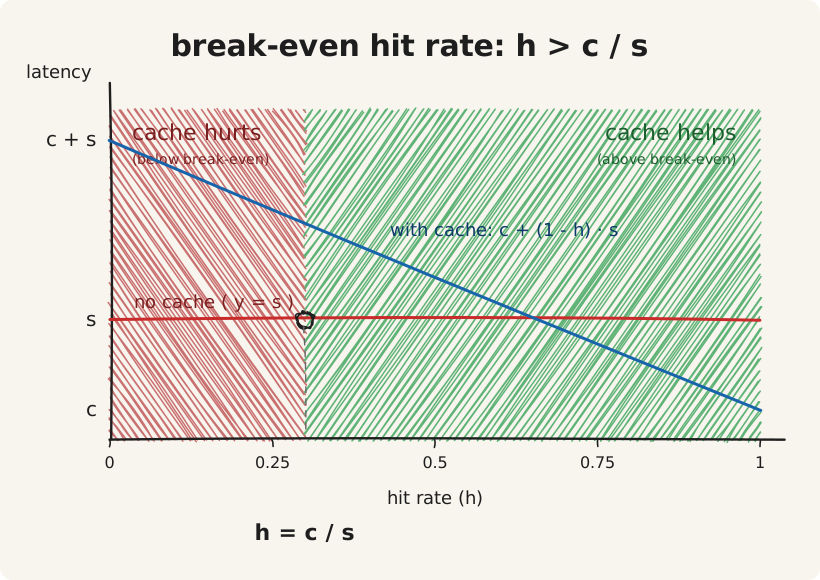
Adding a cache only pays off when the hit rate beats c / s, where c is the cache lookup cost and s is the source cost. The math is one line. Run it first.
The break-even hit rate
Take the average per-request cost with no cache. Every request reads from the source.
cost_no_cache = sNow add a cache. With hit rate h, the average per-request cost becomes:
cost_with_cache = h * c + (1 - h) * (c + s)
                = c + (1 - h) * s
The cache helps when cost_with_cache < cost_no_cache:
c + (1 - h) * s < s
c < h * s
h > c / s
That is the break-even hit rate. Below it, the cache makes the system slower than the no-cache version.
Slow source. A Postgres query takes 10ms. A Redis GET on the same network takes 0.5ms. Break-even: 0.5 / 10 = 5%. Almost any cache helps. The math is forgiving.
Fast source. A Postgres query takes 1ms, the kind of latency you get from a primary-key lookup with a warm buffer pool. A Redis GET takes 0.5ms. Break-even: 0.5 / 1 = 50%. The cache must serve at least half the traffic from memory to break even.
Bad case. A Postgres query takes 0.5ms. A Redis GET takes 0.5ms because the connection pool is cold or the cache lives across an availability zone. Break-even: 100%. The cache cannot help. Adding it always makes the system slower.
This is also the formula that explains why caches in front of SELECT * FROM users WHERE id = ? do not pay off in well-tuned systems. The primary-key lookup is already fast. The cache lookup is in the same order of magnitude. The hit rate cannot move the average below the source latency.
Measuring c, s, and h in practice
The break-even check needs three numbers, all measured from the application’s point of view: c (cache lookup latency), s (source query latency), and h (the hit rate the access pattern can sustain).
c: cache lookup cost
Quick check from the app host:
redis-cli -h <redis-host> -p <port> --latencyRun this from the application machine, not from the Redis box. The avg line includes the network hop you pay for. Stop with Ctrl-C after a couple of minutes.
Distribution:
redis-cli -h <redis-host> -p <port> --latency-history -i 5
redis-cli -h <redis-host> -p <port> --latency-dist
Five-second samples plus a histogram. Useful when the median looks fine but the tail is bad.
Most accurate (instrument the application):
Wrap cache.get() with a timing histogram in whatever metrics stack is in place: Prometheus, OpenTelemetry, statsd. Capture p50, p95, p99 over a representative load window. The numbers include serialization, pool acquisition, Redis processing, and network round-trip. Use p50 in the break-even math. Keep p99 in mind for tail behaviour.
s: source query latency
Single sample with EXPLAIN ANALYZE:
EXPLAIN (ANALYZE, BUFFERS) SELECT * FROM users WHERE id = $1;Run on production-shaped data, not an empty test database. Reports plan time, execution time, and buffer hits and reads. One data point only.
Aggregated production data with pg_stat_statements:
CREATE EXTENSION IF NOT EXISTS pg_stat_statements;Then query the aggregated stats:
SELECT query, calls, mean_exec_time, max_exec_time, stddev_exec_time
FROM pg_stat_statements
WHERE query LIKE '%FROM users WHERE id%'
ORDER BY mean_exec_time DESC
LIMIT 20;
True production latency averaged over real calls. Better signal than EXPLAIN ANALYZE in a quiet window.
Synthetic load with pgbench:
The number that matters is s while the system is busy, not at 3 AM. Either measure during peak, or generate load:
pgbench -c 50 -j 4 -T 60 -f your_query.sql my_databaseh: hit rate
h is the third leg. Even when c / s is favourable, the cache loses if the access pattern cannot reach the threshold.
Sample the access pattern for 5 minutes:
Log every key the application would have asked for. If 100,000 reads land on 5,000 distinct keys, the duplication is high and h will be high. If 100,000 reads land on 95,000 distinct keys, a small cache will struggle.
From an existing cache:
Redis exposes its own counters:
redis-cli INFO stats | grep keyspacekeyspace_hits:8421334
keyspace_misses:1023442Hit rate = hits / (hits + misses). Use this from a similar workload or a staging-deployed prototype.
Replay through a simulator:
Take the access trace, run it through a fixed-size LRU or LFU cache simulator (a 50-line script), and see what fraction hits. Size the simulated cache at 1.5x the expected memory budget.
A worked example
A GET /api/users/{id} endpoint, with numbers from production telemetry:
- p50 cache lookup
c= 0.4 ms - p50 source query
s= 6 ms (Postgres index scan, warm pool) - Sampled traffic: 80,000 reads to 12,000 distinct user IDs over 5 minutes
Break-even: 0.4 / 6 = 0.067, or 6.7%.
Projected hit rate: 12,000 distinct keys against 80,000 reads gives roughly 1 - 12,000 / 80,000 = 85% once the cache is warm and large enough to hold the keys. Halve that for safety: about 42%.
Well above 6.7%, so the cache pays. Average per-request cost drops from 6 ms to 0.4 + (1 - 0.85) * 6 = 1.3 ms, a 4.6 ms saving per request and roughly 78% latency reduction at p50.
A cache is a bet you are willing to lose
Once the math passes, two conditions still need to hold for the data going into the cache.
You are willing to lose it. The cache disappears, you serve from the source, the system keeps working. If the data must survive a restart, the cache is not the right home. Session state pretending to be a cache is the canonical violation. People log in, the cluster restarts, and they all lose their sessions. That is not a cache. It is a database with the wrong durability profile.
You are willing to be wrong about it. The cache returns a value that was correct ten seconds ago. If the business logic cannot tolerate stale reads, the consistency model is the upstream problem; the cache is a downstream decision. A pricing service that caches for an hour and serves yesterday’s price during a flash sale is a consistency bug dressed in cache clothing.
When you add a cache, you trade durability and consistency for latency. Be specific about which trade you are making, and by how much.
Five patterns
Five patterns cover most of what you will build. The first four are common; refresh-ahead shows up in CDN and read-heavy systems.
Cache-aside (lazy loading)
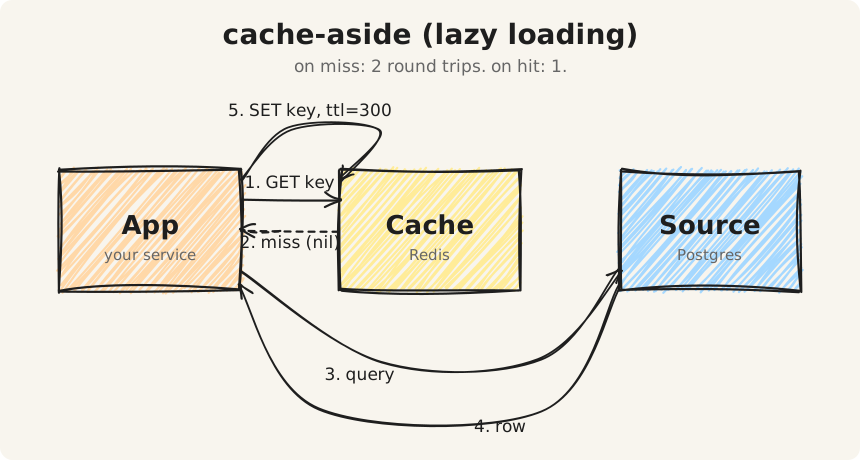
The application reads from the cache. On miss, it reads from the source and writes back. The cache never reaches into the source on its own.
def get_user(user_id):
    key = f"user:{user_id}"
    cached = cache.get(key)
    if cached is not None:
        return deserialize(cached)
    val = db.fetch_user(user_id)
    cache.set(key, serialize(val), ttl=300)
    return val
Reach for this first when in doubt. It survives cache outages. It works with any client. Three things to know before shipping it.
Two round trips on a miss. GET, DB query, SET. The SET can be fire-and-forget if you are willing to sometimes return a value to the user without populating the cache.
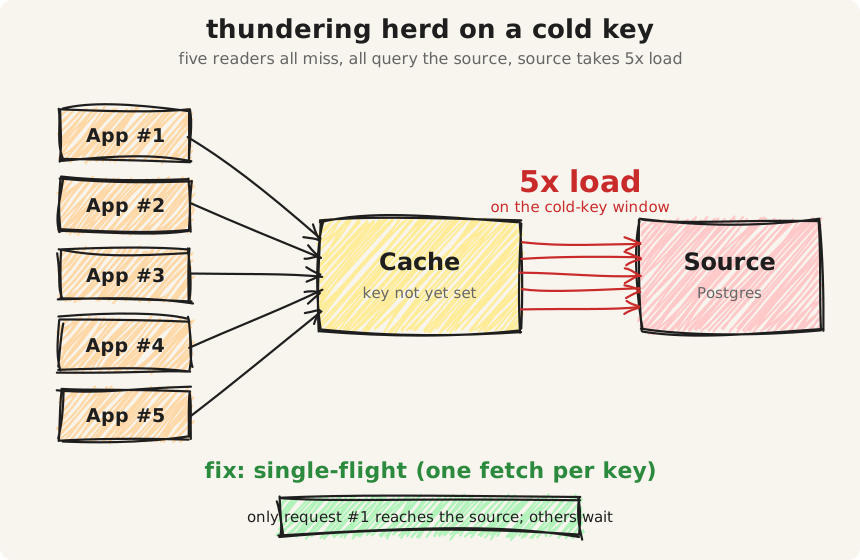
The GET-then-SET race. Two readers can both miss, both query the source, both write to the cache. The cache eventually settles, but the source takes 2x the load during the cold window. For hot keys at high concurrency, this becomes a thundering herd. The fix is single-flight: a per-key lock that lets only one request fetch from the source at a time. Go ships this in golang.org/x/sync/singleflight. Java has Caffeine’s LoadingCache. Python teams roll their own with a Redis SETNX lock or an in-process lock keyed by cache key. Part 8 of this series covers it.
Cache failure handling. When Redis is unavailable, every read becomes a miss. Every miss tries to write to the cache, which fails, which costs another round trip. Decide before deploy whether you fall through to the source on cache failure or return an error. Both are valid. Discovering the answer during an incident is not.
Read-through
The cache acts as a smart proxy in front of the source. The application only talks to the cache, and the cache fetches from the source on miss.
def get_user(user_id):
    return cache.read_through(
        key=f"user:{user_id}",
        loader=lambda: db.fetch_user(user_id),
    )
The application code stays simple. The operational layer gets more complex: a Redis module, a sidecar, a client-side library, or a proxy like Envoy. Read-through is harder to debug because the loader runs inside the cache layer, where the application’s normal observability does not reach.
Write-through
The application writes to the cache, and the cache writes to the source before the write returns.
def update_user(user_id, data):
    cache.write_through(
        key=f"user:{user_id}",
        value=data,
        persistor=lambda: db.update_user(user_id, data),
    )
The cache stays consistent with the source on write. Writes pay the sum of both latencies, not the max. Most write-through implementations are sequential.
If the source write fails after the cache write, the cache and source diverge. The fix is a compensating action on failure: invalidate the cache key, retry the source write, or both. The compensating logic has to live inside the cache adapter, not in application code, otherwise the inconsistency window leaks.
Write-behind (write-back)
The cache absorbs writes and flushes to the source on a delay.
def update_user(user_id, data):
    cache.write_behind(key=f"user:{user_id}", value=data)
    # the source gets updated by a background flush
Writes feel fast. The system loses the most recent writes if the cache dies before flushing. The flush timing is not deterministic, so bugs that depend on it are hard to reproduce. Reserve write-behind for data that can be lost (analytics counters, telemetry) and keep it away from data that cannot (anything financial, anything legally tracked).
Refresh-ahead
The cache refreshes entries before they expire, based on access patterns. The user request hits the cache before the entry has aged out.
def get_article(article_id):
    key = f"article:{article_id}"
    val, ttl_remaining = cache.get_with_ttl(key)
    if ttl_remaining < 60 and is_hot_key(article_id):
        background_refresh(article_id)
    return val
This is what CDNs do with stale-while-revalidate. It hides cold-start latency for known-hot keys. It costs background traffic to the source even when nobody is reading, which is fine for a few hot articles and ruinous for a cache full of long-tail keys.
The point of naming the pattern
The pattern is the design decision. The technology is downstream of it. “We use Redis” is not a design. “We use cache-aside with a 5-minute TTL, single-flight on misses, version-keyed invalidation, and fall-through to the source on cache failure” is a design.
The checklist before shipping
Six checks before adding a cache to any path.
-
Profile first. Find the bottleneck. The slow piece might be serialization, network, or application code instead of the database. If the database is not the slow piece, a cache cannot help.
-
Compute the break-even hit rate. Measure
c(cache lookup latency from the application) ands(source latency under realistic load). Computec / s. Check that the access pattern can plausibly exceed that hit rate. If not, stop here. -
Pick the access pattern. Cache-aside, read-through, write-through, write-behind, refresh-ahead. The pattern dictates the failure modes that need handling.
-
Decide what stale means. Name a number, from a few seconds to an hour. That number becomes a TTL or an invalidation policy. Anything else is the same answer in different words.
-
Estimate the cost of a cold cache. A redeploy empties the cache. A network blip empties the cache. The source has to survive that without falling over. If it cannot, the cache is a single point of failure with extra steps.
-
Pick the failure mode. Write down what happens when the cache is down, before shipping the change. The team should know the failure mode of the cache the same way it knows the failure mode of the database.
If every answer is clean, the cache goes in. If any answer is fuzzy, fix the upstream issue first.
What this series covers
Eight parts on cache as a system. Each post focuses on a part of Redis worth going back to or a failure mode that keeps recurring.
- Part 2: Eviction policies, and why sampled LRU lies to you
- Part 3: Hot keys, and three ways to find them
- Part 4: Memory, fragmentation, and the OOM cliff
- Part 5: Encodings, and how a 50-byte hash uses 200 bytes
- Part 6: Client-side caching with RESP3
- Part 7: Pipelining, multiplexing, connection pooling
- Part 8: Cache invalidation in practice
Each post stands alone. Read the ones that match what you are debugging this week.